User manual · Version 1
WaveSkanner
Windowed audio player with time-stretch, effects and MIDI sync.
01Overview
WaveSkanner loops an audio file inside a window that you move and animate in real time. It is not a granular synth: it plays the sound as recorded, with a time-stretch that keeps pitch independent of speed.
Three elements on the waveform
The point in the file around which everything happens. Orange line.
The zone actually played around the head: forward, reverse or ping-pong. Green zone.
A wider zone in which W1 can move on its own. Dashed frame.
Signal chain
The sound always goes through the effects in this order. Two sine LFOs modulate the filter cutoff and the volume.
- Playbackhead · W1 · W2
- Driveauto level
- Filter4 types · LFO
- Tape delaywow · feedback
- Reverbroom → shimmer
- Outputvolume · LFO
This manual names every control as it appears on the instrument, for example PREVIEW or SYNC.
↑ Back to top02The instrument
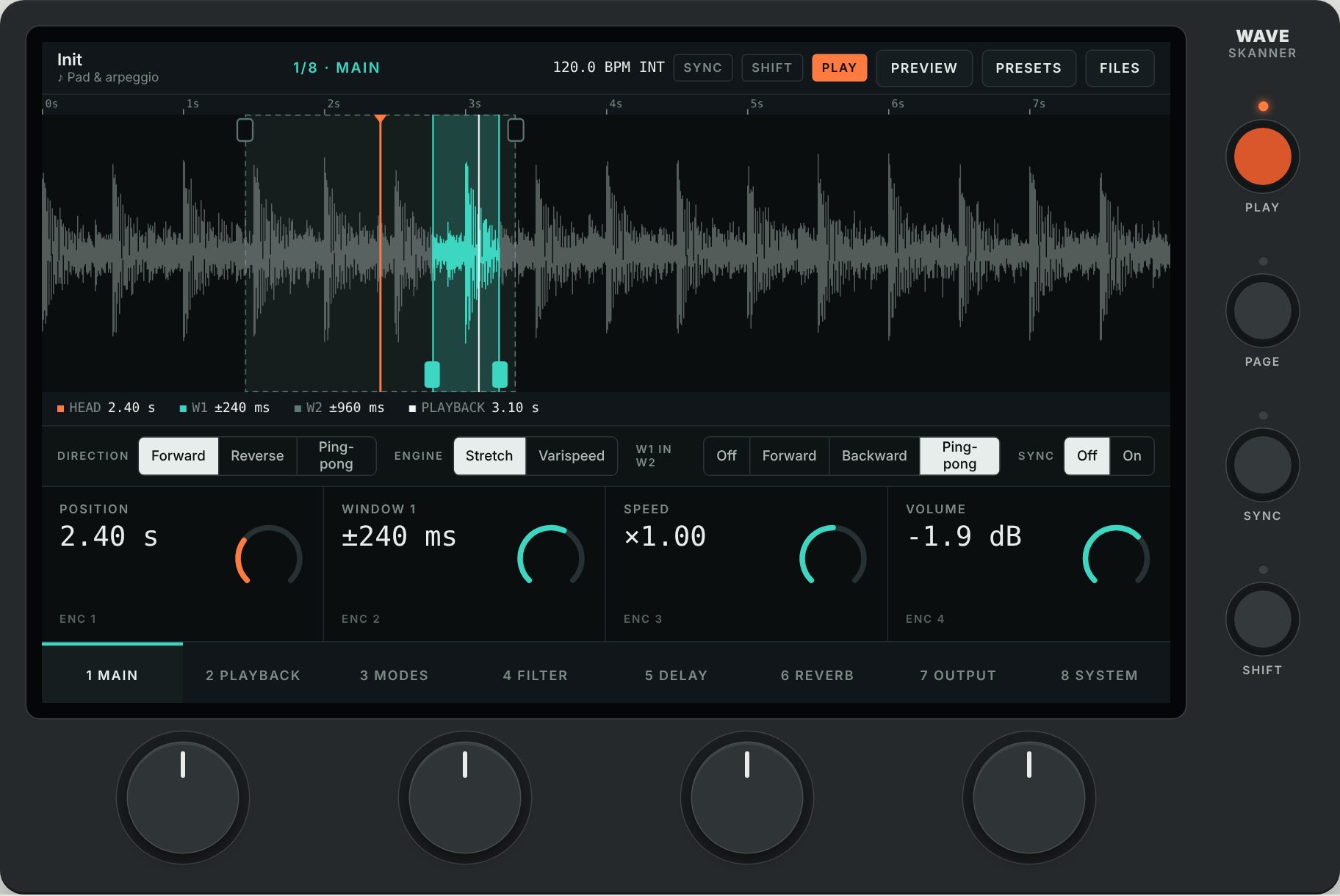
One touchscreen, four encoders, four buttons.
| Control | Function |
|---|---|
| Screen | 7-inch touchscreen (1024 × 600): waveform, settings and menus. See chapter 03. |
| Encoders 1 to 4 | Each one sets the parameter shown right above it, depending on the current page. |
| PLAY | Starts or stops playback. With Shift: preview of the original. |
| PAGE | Goes to the next page. With Shift: previous page. |
| SYNC | Turns tempo sync on or off. With Shift: tap tempo. |
| SHIFT | Gives the other controls their second function. |
Status lights
| Light | Meaning |
|---|---|
| Above PLAY | On (orange) during playback. |
| Above SYNC | Blinks (green) on every beat when sync is on. |
| Above SHIFT | On (white) when Shift is active. |
No push switch in the encoders. Everything is done by turning. Precision comes from acceleration and Shift (chapter 04); a double-tap on the screen resets a value.
↑ Back to top03The screen
Five bands, top to bottom.
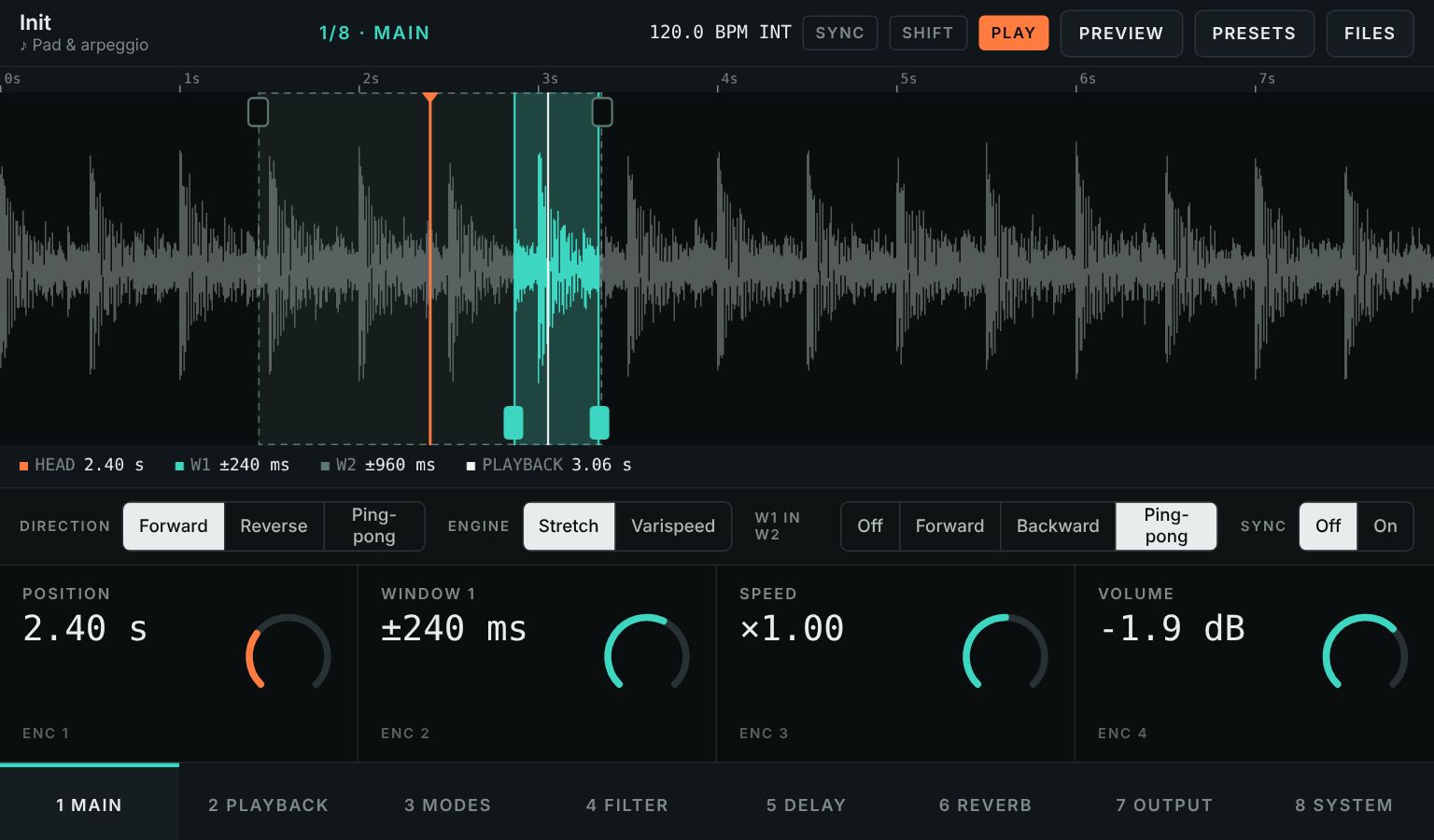
- Top bar. Preset name (a star appears as soon as it is modified), loaded sound, page, tempo and its source (INT or MIDI), SYNC SHIFT PLAY indicators, then PREVIEW PRESETS FILES.
- Waveform. The whole file with the head (orange), W1 (green), W2 (dashed), the current play position (white) and, during preview, the original position (yellow). Below: HEAD, W1, W2 and PLAYBACK in time.
- Mode row, by touch. DIRECTION, ENGINE, W1 IN W2 and SYNC. On the FILTER page: FILTER TYPE. On the SYSTEM page: clock status and MIDI START/STOP.
- Four tiles, one per encoder, right above it: name, value and position ring. For cutoff and volume, the ring follows the LFO; a dot keeps the set value.
- Tabs for the 8 pages: one touch jumps straight to a page.
Touch gestures
| Gesture | Effect |
|---|---|
| Touch or drag on the waveform | Places the play head. |
| Drag a solid handle (bottom) | Sets the width of W1. |
| Drag a hollow handle (top) | Sets the width of W2. |
| Drag vertically on a tile | Changes its value, like the encoder. |
| Touch a selector tile | Steps to the next choice (Direction, Engine…). |
| Double-tap a tile | Restores the default value. |
04Encoders and shortcuts
The encoders adapt to rotation speed. Turned slowly, each detent makes a small, precise step; turned quickly, steps up to 25 times larger sweep the whole range in one gesture.
10 detents → 1 % of the range
10 detents → about 21 % of the range
Measured on the Position parameter.
Special steps
- Pitch: whole semitones. With Shift: hundredths of a semitone.
- Tempo: 0.1 BPM, accelerated when turned fast. With Shift: 0.01 BPM.
- Selectors (Direction, Reverb type, divisions…): one choice every two detents.
All shortcuts
| Control | Effect |
|---|---|
| Turn an encoder | Adjust with acceleration. |
| SHIFT + turn | Extra-fine adjustment. The FINE badge appears in the tiles. |
| PLAY | Starts or stops playback. During a preview: stops the preview and restarts playback. |
| SHIFT + PLAY | Preview of the original, from start to end. |
| PAGE | Next page. |
| SHIFT + PAGE | Previous page. |
| SYNC | Turns tempo sync on or off. |
| SHIFT + SYNC | Tap tempo. |
| Double-tap a tile | Default value of the parameter. |
05The 8 pages
The PAGE button or the tabs change the page. Basic rule: a parameter and its modulation are always on the same page.
- ENC 1Position
- ENC 2Window 1
- ENC 3Speed / Pass
- ENC 4Volume
- ENC 1Window 2
- ENC 2Pitch
- ENC 3W1 motion
- ENC 4W1 move rate / cycle
- ENC 1Direction
- ENC 2Sweep
- ENC 3Engine
- ENC 4Back & forth
- ENC 1Cutoff
- ENC 2Reso
- ENC 3Cutoff LFO rate
- ENC 4Cutoff LFO depth
- ENC 1Delay time
- ENC 2Feedback
- ENC 3Wow
- ENC 4Delay mix
- ENC 1Reverb type
- ENC 2Size
- ENC 3Shimmer
- ENC 4Reverb mix
- ENC 1Drive
- ENC 2Volume
- ENC 3Volume LFO rate
- ENC 4Volume LFO depth
- ENC 1MIDI start/stop
- ENC 2Sync
- ENC 3Tempo
- ENC 4Sync offset
With sync on, speed settings become musical divisions: Speed becomes Pass, W1 move rate becomes W1 move cycle, and both LFO rates also switch to divisions (chapter 07).
↑ Back to top06Parameters in detail
Playback · pages 1 to 3
| Position | Places the head in the file. |
| Window 1 · 2 | Half-width of W1 and W2, from a few ms to All (the whole file). W2 ≥ W1. Near an edge, the windows slide inward. |
| Speed | From ×0 (frozen sound) to ×4. With sync: Pass, the duration of one pass through W1. |
| Pitch | −24 to +24 semitones, independent of speed in Stretch. |
| W1 motion | Off, Forward, Backward (cycle with a jump) or Ping-pong. |
| W1 move rate | Speed of W1's motion in Hz; with sync, W1 move cycle. |
| Direction | Playback inside W1: Forward, Reverse or Ping-pong. |
| Sweep | Smooth rounds off direction changes; Hard makes them sharp. |
| Engine | Stretch: independent pitch. Varispeed: speed and pitch linked, like tape. |
| Back & forth | Smooth or Hard for W1's back-and-forth inside W2. |
Effects · pages 4 to 7
| Filter type | Low-pass, High-pass, Band-pass, Notch. |
| Cutoff · Reso | Cutoff from 40 Hz to 18 kHz, resonance. 12 dB filter. |
| Cutoff LFO | Sine from 0.02 to 20 Hz, depth up to ±4 octaves. |
| Delay time | From 20 ms to 2 s. |
| Feedback · Wow | Echo feedback; tape-style instability. |
| Reverb type | Room, Plate, Hall, Shimmer (octave up in the loop). |
| Size · Shimmer | Reverb size; shimmer intensity. |
| Mix | Delay and reverb amount. |
| Drive | Saturation, level compensated automatically. |
| Volume LFO | Tremolo; at 100 %, the volume dips down to silence. |
Good to know. In High-pass with the cutoff all the way up, almost everything is cut: lower the cutoff to hear the sound again. In Varispeed with sync on, the division sets the speed, so pitch follows.
↑ Back to top07Sync and MIDI clock
With SYNC on, playback inside W1, W1's motion inside W2 and both LFOs lock to the tempo and always land on the bar, even while you turn the encoders.
- Internal: Tempo encoder (SYSTEM page), from 40 to 240 BPM.
- Tap tempo: SHIFT + SYNC, or touch the Tempo tile, at least two taps.
- MIDI clock: as soon as it arrives, it takes over. The top bar shows BPM MIDI.
- MIDI start/stop: Follow obeys Start, Stop and Continue; Ignore keeps only the tempo.
- Sync: same as the SYNC button.
- Tempo: internal tempo.
- Sync offset: latency compensation, 0 to 200 ms. The engine plays ahead by this amount so the sound comes out together with your other gear.
Musical divisions
From 16 bars to 1/32, with dotted values (1/4., 1/8.) and triplets (1/4T, 1/8T). In Ping-pong, each way lasts one division.
Setting Sync offset. Fine-tune it by ear with a loop next to a drum machine. Tempo, Sync offset and MIDI start/stop are not saved in presets.
↑ Back to top08Sounds and files
Loading a sound
- Touch FILES.
- Touch a name to load it, or IMPORT A FILE…. The ▶ button auditions a sound without loading it.
WAV, MP3, OGG and FLAC, mono or stereo. Recommended: WAV 16 or 24-bit, 44.1 or 48 kHz.
Previewing the original
SHIFT + PLAY, or PREVIEW, plays the sound as is, from start to end, with no windows or effects. Playback stops, the PREVIEW button turns yellow and a yellow cursor follows the original on the waveform. Only one mode runs at a time: playback, preview or stop.
Touching the waveform moves the head without interrupting the preview. To stop: the same control, or PLAY, which restarts playback.
Built-in sounds
Pad & arpeggio · FM bells · Drum loop · Synth voice · Spoken voice · High spoken voice · Whispers · Choir · Drone · Bass riff. The voices are synthesized: the rhythm and intonation of a sentence, without real words.
↑ Back to top09Presets
40 factory presets in two groups, FACTORY and VOICES, plus your own. A selection:
| Preset | Sound | Idea |
|---|---|---|
| Slow ice | FM bells | Very slow playback, +12 semitones, shimmer, slow tremolo |
| Worn tape | Drum loop | Varispeed in reverse, heavy wow, echo |
| Sweep | Synth voice | Ping-pong inside W1, W1 cycling forward |
| Freeze | Drone | Speed 0, W1 drifting inside W2 |
| Rust | Bass riff | Drive, modulated resonant filter, short loop |
| AM radio · Telephone | Spoken voices | Band-pass, light saturation |
| Megaphone · Robot | Spoken voices | Heavy saturation, echo; very short feedback delay |
| Celestial choir | Choir | Slow playback, shimmer |
| Frozen choir | Choir | Speed 0, W1 drifting, large hall |
| Glass harp | FM bells | Slow, +7 semitones, shimmer |
| Dub echo | Drum loop | Band-pass, long tape echo with heavy feedback |
| Acid wobble | Bass riff | Resonant filter swept by the LFO, drive |
| Lo-fi beat | Drum loop | Varispeed, saturation, dark filter, wow |
| Whisper cloud | Whispers | Short moving window, shimmer, long echo |
- Touch PRESETS.
- Type a name in New preset name.
- Leave Include sound ticked to keep the sound with the preset.
- Touch SAVE: it appears under USER PRESETS.
- A star next to the name means the preset was modified.
- Tempo, volume, Sync offset and MIDI start/stop are not saved in presets.